text.editor-buffer User’s Manual 
This manual is for text.editor-buffer version 0.3.0.
Copyright © 2015 – 2022 Robert Strandh
Copyright © 2023 – 2026 Jan Moringen
Table of Contents
- 1 Introduction
- 2 External Protocols
- 2.1 Packages and Use Recommendation
- 2.2 Thread Safety
- 2.3 Conditions
- 2.4 Protocol Classes
- 2.5 Location Comparison Protocol
- 2.6 Item Container Protocol
- 2.7 Line Number Protocol
- 2.8 Buffer Link Protocol
- 2.9 Cursor Protocol
- 2.10 Line Protocol
- 2.11 Buffer Protocol
- 2.12 Update Protocol
- 2.13 Convenience Functions
- 3 Implementation Protocols
- 3.1 Location Comparison Implementation Protocol
- 3.2 Item Container Implementation Protocol
- 3.3 Line Link Implementation Protocol
- 3.4 Buffer Link Implementation Protocol
- 3.5 Cursor Implementation Protocol
- 3.6 Line Implementation Protocol
- 3.7 Dock Protocol
- 3.8 Buffer Implementation Protocol
- 3.9 Update Implementation protocol
- 4 Implementations
- Concept Index
- Function and Macro and Variable and Type Index
- Changelog
1 Introduction 
text.editor-buffer is a library for representing the buffer of a text editor. As such, it defines a set of Common Lisp Object System protocols for client code to interact with the buffer contents in various ways, and it supplies different implementations of those protocols for different purposes.
The buffer protocols have been chosen so that they can fit a variety of
editors. As a consequence, they are not particularly Emacs-centric.
For example, in Emacs, a newline character is just another character, so
that moving past it using the forward-char command changes the
line in which point is located, and using the
delete-char command when point is to the left of a
newline character joins the line to the next one.
In contrast, the buffer protocols documented here are line
oriented and there is no newline character; only a sequence of lines.
At some level, it is of course desirable to have Emacs-compatible
commands, but these commands are written separately, using this buffer
protocol to accomplish the effects. For example, the Emacs-compatible
forward-item command (which this library does not provide; see
https://codeberg.org/scymtym/text.editing for a possible
implementation) checks whether it is at the end of a line, and if so,
detaches the cursor from that line and attaches it to the next one.
Similarly, the Emacs compatible delete-item command calls
text.editor-buffer:join-line in the buffer protocol to obtain the
desired effect when it is at the end of a line.
Figure 1.1 gives a simplified overview of the architecture of text.editor-buffer in terms of the most important concepts and their composition. For a more complete picture, see Implementation Protocols. As mentioned above, a buffer consists of a sequence of lines which in turn consist of a sequence of items (not necessarily characters). In addition to containing items, lines can have zero, one or multiple cursors associated with them. Each cursor has an index which references a spot between two items of the associated line or the spot before the first item or the spot after the last item.
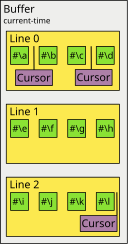
Figure 1.1: An example of important text.editor-buffer concepts and their composition for a single buffer.
By writing the editor commands in two levels like this, we hope it
will be easier to use the buffer protocols to write emulators for
other editors, such as VIM.
The buffer participates in two different buffer protocols:
- The edit protocol, used by client editing and cursor-motion operations.
- The update protocol, used by redisplay operations to determine what items are contained in the buffer.
The operations in the edit protocol were designed to be fast
(typically around 10 μs) so that it is practical to use these
operations in a loop, say to insert or delete a region, or to accomplish
several operations inside a keyboard macro. The exceptions are the
operations text.editor-buffer:split and text.editor-buffer:join
that take time proportional to the number of items in the second
line. 1
The operations in the update protocol were designed to be called at the frequency of the event loop of an application, typically once for each character typed, but also when a window is resized or scrolled (in which case, these operations are very fast since no modifications to the buffer have occurred).
The buffer edit protocols expose two levels of abstraction to client code:
- The buffer level represents the sequence of lines independently of how the individual lines are represented.
- The line level represents individual lines.
As mentioned above, the buffer protocols do not pretend to manage any
equivalence between line breaks and some sequence of characters. It is
up to client code to model such an equivalence if desired. As a
consequence, the buffer protocols do not allow for a cursor at the
beginning of a line to move backward or a cursor at the end of a line to
move forward. An attempt at doing so will result in an error being
signaled. If client code wants to impose a model where the line break
corresponds to (say) the newline character, then it must
explicitly detach and reattach the cursor to a different line in these
cases. It can manage that in two different ways: either by explicitly
testing for text.editor-buffer:beginning-of-line-p or
text.editor-buffer:end-of-line-p before calling the equivalent
buffer function, or by handling the error that results from the attempt.
The buffer also does not interpret the meaning of any of items contained
in it. For instance, whether an item is to be considered part of a
word or not, is not decided at the buffer level, but at the level
of the syntax. As a consequence, the buffer protocol does not offer any
functions that require such interpretation, such as forward-word,
end-of-paragraph, etc.
2 External Protocols 
2.1 Packages and Use Recommendation 
All symbols that are relevant to external protocols are in the package
named text.editor-buffer. We recommend against client code using
this package in the sense of the :use option to
cl:defpackage or in the sense of calling
cl:use-package. The reason for this recommendation is that we
can not guarantee that future additions to this library will not define
external symbols that conflict with symbols in the common-lisp
package or symbols used by the client for other purposes.
Instead, we recommend that client code use explicit package prefixes, possibly in combination with package-local nicknames. In addition to avoiding future conflicts, this practice will make the origin of the respective symbol obvious from the source code.
2.2 Thread Safety 
Operations in text.editor-buffer are not safe to perform concurrently when the operations either directly involve a common object or the involved objects are (directly or indirectly) attached to a common object. An example of the latter case would be concurrent operations on two distinct cursors that are attached to lines which in turn are attached to the same buffer (See Figure 1.1 for the concepts and their relations). Put differently, concurrent operations are safe on distinct detached objects or objects with disjoint attachment relations. In particular note that even if the two cursors in the example are attached to different lines, concurrent operations on the cursors are still unsafe if the lines are ultimately attached to the same buffer.
2.3 Conditions 
text.editor-buffer defines a number of conditions that are signaled when text.editor-buffer is unable to fulfill the contract stipulated by the protocol function being used. The condition types used by text.editor-buffer are arranged slightly hierarchically as can be seen in the following diagram:
editor-buffer-error
+-bounding-indices-error
+-cursor-attached-error
+-cursor-detached-error
+-cursors-not-comparable-error
+-line-detached-error
`-location-error
  +-cursor-location-error
  | +-beginning-of-buffer-error
  | +-beginning-of-line-error
  | +-end-of-buffer-error
  | `-end-of-line-error
  +-invalid-line-index-error
  `-line-location-error
    +-invalid-item-index-error
    `-join-last-line-error
The hierarchical arrangement allows clients to handle certain groups of
conditions by using the associated supertype and allows reader functions
that are applicable to all subtypes of a condition type such as
text.editor-buffer:cursor being applicable to all subtypes of
text.editor-buffer:cursor-location-error.
- Class: editor-buffer-error [text.editor-buffer] 
-
This condition type is the base of all error conditions signaled by text.editor-buffer. Client code that wishes to handle all error conditions signaled by text.editor-buffer may use this condition type in its condition handlers.
- Class: location-error [text.editor-buffer] 
-
This condition type is the base of all error conditions involving a location such as the current location of a cursor, an item index within a line or a line within a buffer.
The following conditions are signaled when an operation on one or more cursors cannot be performed because the supplied cursors are not in the correct state in some way such as not being attached to a suitable line or (indirectly) a suitable buffer. When any of these conditions is signaled, the cause is a program error in text.editor-buffer or the client program (as opposed to something the end user did).
- Class: cursors-not-comparable-error [text.editor-buffer] 
-
This condition is signaled when an attempt is made to compare two cursors which are each attached to a line but the lines do not belong to the same buffer. The readers
cursor1andcursor2can be used to obtain the offending cursor objects.
- Class: cursor-attached-error [text.editor-buffer] 
-
This condition is signaled when an attempt is made to use a cursor in an operation that requires that cursor to be detached, but the cursor used in the operation is attached to a line.
- Class: cursor-detached-error [text.editor-buffer] 
-
This condition is signaled when an attempt is made to use a cursor in an operation that requires that cursor to be attached, but the cursor used in the operation is not attached to any line.
- Class: line-detached-error [text.editor-buffer] 
-
This condition is signaled when an attempt is made to use a line in an operation that requires the line to be attached to a buffer, but the line used in the operation is not attached to a buffer. An example of such an operation would be to attempt to get the line number of the line, given that the line number of a line is determined by the buffer to which the line is attached.
The following conditions are signaled when an operation cannot be performed for the location of a cursor within a line or buffer. The cause for signaling one of these conditions can be either a program error (in text.editor-buffer or the client program) or an operation requested by the end user. Clients can therefore allow end users to request operations on invalid locations and handle the resulting conditions by displaying the condition report to the end user.
- Class: cursor-location-error [text.editor-buffer] 
-
Subtypes of this condition type are signaled when an operation cannot be performed for the location of a cursor within a line or buffer. The cursor in question can be retrieved via the
text.editor-buffer:cursorreader.
- Generic Function: cursor [text.editor-buffer] condition 
-
Return the cursor object for the location of which an operation could not be performed.
condition is a condition of type
text.editor-buffer:cursor-location-error.
- Class: beginning-of-line-error [text.editor-buffer] 
-
This condition is signaled when an attempt is made to use an index that is negative, either by moving a cursor there, or by attempting to access an item at such an index.
- Class: end-of-line-error [text.editor-buffer] 
-
This condition is signaled when an attempt is made to use an index that is too large, either by moving a cursor there, or by attempting to access an item at such an index. Notice that in some cases, “too large” means “strictly greater than the number of items in a line”, and sometimes it means “greater than or equal to the number of items in a line”. For example, it is perfectly acceptable to move a cursor to an index that is equal to the number of items in a line, but it is not acceptable to attempt to access an item in a line at that index.
- Class: beginning-of-buffer-error [text.editor-buffer] 
-
This condition is signaled when an attempt is made to use a line number that is negative, for example by issuing a “previous line” or “goto line” cursor movement command for which the target line number that gets passed to
text.editor-buffer:find-lineis negative.
- Class: end-of-buffer-error [text.editor-buffer] 
-
This condition is signaled when an attempt is made to use a line number that is too large, for example by issuing a “next line” or “goto line” cursor movement command for which the target line number that gets passed to
text.editor-buffer:find-lineis larger than the number of lines in the buffer.
The following conditions are signaled when an operation cannot be performed for a given index within a line or for a given line object within buffer.
- Class: line-location-error [text.editor-buffer] 
-
Subtypes of this condition type are signaled when an operation cannot be performed for a given index within a line or for a given line within buffer.
The line in question can be retrieved via the
text.editor-buffer:linegeneric function (the main purpose of which is to retrieve the line to which a cursor is attached).
- Class: invalid-item-index-error [text.editor-buffer] 
-
This condition is signaled when an attempt is made to access an item within a line at an index that is not valid for that line. An invalid index is either negative or too large given the item count of the line. Notice that in some cases, “too large” means “strictly greater than the number of items in the line”, and sometimes it means “greater than or equal to the number of items in the line”. For example, it is perfectly acceptable to split a line at an index that is equal to the number of items in the line, but it is not acceptable to attempt to access an item at that index.
- Class: join-last-line-error [text.editor-buffer] 
-
This condition is signaled when an attempt is made to join the last line of a buffer with its (non-existent) successor line.
The following conditions are signaled when an operation cannot be performed for a given line index within buffer.
- Class: invalid-line-index-error [text.editor-buffer] 
-
This condition is signaled when an attempt is made to access a line within a buffer at a line number that is not valid for that buffer. An invalid index is either negative or too large given the line count of the buffer.
The buffer in question can be retrieved via the
text.editor-buffer:buffergeneric function (the main purpose of which is to retrieve the buffer to which a cursor or line is attached).
The following final condition is signaled when bad bounding index designators are supplied to a protocol function.
- Class: bounding-indices-error [text.editor-buffer] 
-
This condition is signaled when invalid bounding index designators are supplied.
Bounding index designators are accepted as optional arguments by the generic function
text.editor-buffer:items.
2.4 Protocol Classes 
The protocol classes described in this section serve as universal superclasses for the classes of certain text.editor-buffer objects. The purpose of protocol classes is mainly to allow specializing methods on protocol functions such that the methods are applicable to all objects that play a certain role in the respective protocol, regardless of the classes of those objects.
- Class: cursor [text.editor-buffer] 
-
This is the superclass for all cursors. It should not itself be instantiated. Instead, text.editor-buffer contains two different modules each supplying two different subclass that can be instantiated (see Implementations).
By default, it is recommended that client code instantiate the class
text.editor-buffer.standard-line:right-sticky-cursor. This is also whattext.editor-buffer:make-bufferdoes by default.
- Class: line [text.editor-buffer] 
-
This class is the superclass for all lines. It should not itself be instantiated. Instead, text.editor-buffer contains two different modules each supplying a different subclass that can be instantiated (see Implementations).
- Class: buffer [text.editor-buffer] 
-
This is the superclass for all buffers. It should not itself be instantiated. Instead, text.editor-buffer contains different modules, each providing a different subclass that can be instantiated (see Implementations).
By default, it is recommended that client code instantiate the class
text.editor-buffer.standard-buffer:buffer. This is also whattext.editor-buffer:make-bufferdoes by default.
2.5 Location Comparison Protocol 
Cursors which are attached to lines which belong to the same buffer can be lexicographically ordered based on their line numbers and within-line indices. The functions in this protocol allow comparing cursor objects according to this order.
This functions in this protocol perform checks for invalid arguments, group their arguments into one or more binary operator applications, flip the comparison direction where necessary and then call functions in the location comparison implementation protocol which implement the core behavior based on the classes of the supplied cursors.
- Function: location< [text.editor-buffer] cursor
&restmore-cursors ¶ -
Return true if for each adjacent pair of cursors (c1,c2) in the sequence of cursors consisting of cursor followed by more-cursors, c1 is positioned before c2 in the buffer. This function calls the generic function
text.editor-buffer.implementation:location<for each such pair to check whether the property holds. As a consequence, return true if only cursor is supplied.If any of the cursor is not currently attached to a line, a condition of type
text.editor-buffer:cursor-detached-erroris signaled. Unless all cursor are attached to lines which belong to the same buffer, a condition of typetext.editor-buffer:cursors-not-comparable-erroris signaled.
- Function: location<= [text.editor-buffer] cursor
&restmore-cursors ¶ -
Return true if for each adjacent pair of cursors (c1,c2) in the sequence of cursors consisting of cursor followed by more-cursors, c1 is positioned before c2 or at the same location as c2 in the buffer. This function calls the generic function
text.editor-buffer.implementation:location<=for each such pair to check whether the property holds. As a consequence, return true if only cursor is supplied.If any of the cursors is not currently attached to a line, a condition of type
text.editor-buffer:cursor-detached-erroris signaled. Unless all cursors are attached to lines which belong to the same buffer, a condition of typetext.editor-buffer:cursors-not-comparable-erroris signaled.
- Function: location= [text.editor-buffer] cursor
&restmore-cursors ¶ -
Return true if all cursors in the sequence of cursors consisting of cursor followed by more-cursors are positioned at the same location in the buffer. This function calls the generic function
text.editor-buffer.implementation:location=for pairs of cursors to check whether the property holds. As a consequence, return true if only cursor is supplied.If any of the cursors is not currently attached to a line, a condition of type
text.editor-buffer:cursor-detached-erroris signaled. Unless all cursors are attached to lines which belong to the same buffer, a condition of typetext.editor-buffer:cursors-not-comparable-erroris signaled.
- Function: location/= [text.editor-buffer] cursor
&restmore-cursors ¶ -
Return true if no two cursors in the sequence of cursors consisting of cursor followed by more-cursors are positioned at the same location in the buffer. This function calls the generic function
text.editor-buffer.implementation:location=for all pairs of cursors to check whether the property is violated. As a consequence, return true if only cursor is supplied.If any of the cursors is not currently attached to a line, a condition of type
text.editor-buffer:cursor-detached-erroris signaled. Unless all cursors are attached to lines which belong to the same buffer, a condition of typetext.editor-buffer:cursors-not-comparable-erroris signaled.
- Function: location>= [text.editor-buffer] cursor
&restmore-cursors ¶ -
Return true if for each adjacent pair of cursors (c1,c2) in the sequence of cursors consisting of cursor followed by more-cursors, c1 is positioned after or at the same location as c2 in the buffer. This function calls the generic function
text.editor-buffer.implementation:location<for each such pair to check whether the property is violated. As a consequence, return true if only cursor is supplied.If any of the cursors is not currently attached to a line, a condition of type
text.editor-buffer:cursor-detached-erroris signaled. Unless all cursors are attached to lines which belong to the same buffer, a condition of typetext.editor-buffer:cursors-not-comparable-erroris signaled.
- Function: location> [text.editor-buffer] cursor
&restmore-cursors ¶ -
Return true if for each adjacent pair of cursors (c1,c2) in the sequence of cursors consisting of cursor followed by more-cursors, c1 is positioned strictly after c2 in the buffer. This function calls the generic function
text.editor-buffer.implementation:location<=for each such pair to check whether the property is violated. As a consequence, return true if only cursor is supplied.If any of the cursors is not currently attached to a line, a condition of type
text.editor-buffer:cursor-detached-erroris signaled. Unless all cursors are attached to lines which belong to the same buffer, a condition of typetext.editor-buffer:cursors-not-comparable-erroris signaled.
2.6 Item Container Protocol 
The generic functions in this protocol can be applied to
text.editor-buffer:cursor instances and
text.editor-buffer:line instances and
text.editor-buffer:buffer instances.
The functions in this protocol perform checks for invalid arguments and invalid state then call the generic functions of the item container implementation protocol to perform the core behavior based on the class of the supplied container.
- Generic Function: item-count [text.editor-buffer] container 
-
If container is an attached cursor, return the number of items in the line to which container is attached. If container is not currently attached to a line, a condition of type
text.editor-buffer:cursor-detached-erroris signaled.If container is a line, then return the number of items in that line.
If container is a buffer, then return the total number of items in that buffer.
- Generic Function: items [text.editor-buffer] container
&optionalstart end ¶ -
Return the sequence items of container or the specified subsequence as a vector.
The optional parameters start and end have the same interpretation as for the
cl:subseqfunction. If start and end are not valid bounding index designators, a condition of typetext.editor-buffer:bounding-indices-erroris signaled.If container is an attached cursor, operate on the sequence or a subsequence of the items of the line to which container is attached. If container is not currently attached to a line, a condition of type
text.editor-buffer:cursor-detached-erroris signaled.If container is a line, operate on the sequence or a subsequence of the items of that line.
If container is a buffer, then operator on the sequence or a subsequence of all items in that buffer.
note: If container is a buffer and start and end select only a small subsequence of all items, the function will currently likely require a similar amount of computation as selecting all items. The reason is that this functions does not currently use an efficient method of mapping linear indices like start and end to the respective line which contains that linear index.
- Generic Function: clear [text.editor-buffer] container 
-
Remove all items from container and return container.
If container is an attached cursor, remove the items contained in the line to which container is attached. If container is not currently attached to a line, a condition of type
text.editor-buffer:cursor-detached-erroris signaled.If container is a line, remove the items contained in the line.
If container is a buffer, remove all items from all lines of the buffer and join all empty lines into a single, empty line.
The behavior of this function is equivalent to repeatedly calling
text.editor-buffer:delete-itemuntil the given line or all lines are empty and, when operating on a buffer, then repeatedly callingtext.editor-buffer:joinuntil only a single line remains. In particular, this function does not detach any cursors so that all cursors are located at index 0 of the given line or the sole remaining line after this function returns. The reason for the existence of this function is the improved convenience compared to the equivalent operations described above as well as the fact that its implementation can be orders of magnitude more efficient.This function typically checks the supplied arguments and then calls
text.editor-buffer.implementation:clearto perform the operation.
2.7 Line Number Protocol 
The generic functions in this protocol can be applied to
text.editor-buffer:cursor instances and
text.editor-buffer:line instances.
- Generic Function: line-number [text.editor-buffer] thing 
-
Return the line number of thing.
If thing is a cursor and that cursor is attached to a line, then the generic function
text.editor-buffer:lineis called with thing as its argument and the return value is used as the argument in a recursive call toline-numberwhich behaves as described below. If thing is a cursor and that cursor is not attached to any line, a condition of typetext.editor-buffer:cursor-detached-erroris signaled.If thing is a line and that line is attached to a buffer, then the line number of line in that buffer is returned. The first line of the buffer has the number 0. If thing is a line that is not attached to a buffer, a condition of type
text.editor-buffer:line-detached-erroris signaled.
2.8 Buffer Link Protocol 
This protocol allows obtaining the buffer, if any, to which an object is
directly or indirectly attached. The generic functions in this protocol
can be applied to text.editor-buffer:cursor instances and
text.editor-buffer:line instances.
- Generic Function: buffer [text.editor-buffer] thing 
-
Return the buffer to which thing is directly or indirectly attached.
If thing is an attached cursor, then return the buffer of the line to which the cursor is attached. If thing is a cursor that is not currently attached to a line, a condition of type
text.editor-buffer:cursor-detached-erroris signaled.If thing is a an attached line, then return the buffer to which the line is attached. If thing is a line that is not currently attached to a buffer, a condition of type
text.editor-buffer:line-detached-erroris signaled.Note that this generic function also serves the role of a reader for the condition type
text.editor-buffer:invalid-line-index-error.
2.9 Cursor Protocol 
This protocol extends the location comparison, item
container, line number and
buffer link protocols. As a result, the
functions that from those protocols such as
text.editor-buffer:location<, text.editor-buffer:item-count,
text.editor-buffer:line-number and text.editor-buffer:buffer are
applicable to cursor objects.
- Generic Function: line [text.editor-buffer] cursor 
-
Return the line to which cursor is attached or
nilif cursor is not attached.This function typically calls
text.editor-buffer.implementation:lineto actually perform the operation.Note that this generic function also serves the role of a reader for the condition type
text.editor-buffer:line-location-error.
- Generic Function: stickiness [text.editor-buffer] cursor 
-
Return either
:leftor:rightto indicate the stickiness of cursor.This function typically calls
text.editor-buffer.implementation:stickinessto actually perform the operation.
Cursor Attachment 
- Function: attachedp [text.editor-buffer] cursor 
-
Return true if cursor is attached to a line and return
nilotherwise.
- Generic Function: attach [text.editor-buffer] cursor line
&optional(index 0) ¶ -
Attach cursor to line at index.
If index is supplied and it is greater than the number of items in line, the
text.editor-buffer:end-of-line-erroris signaled. If cursor is already attached to a line,text.editor-buffer:cursor-attached-erroris signaled.This function typically calls
text.editor-buffer.implementation:attachto actually perform the operation.
- Generic Function: detach [text.editor-buffer] cursor 
-
Detach cursor from the line to which it is attached.
If cursor is already detached, a condition of type
text.editor-buffer:cursor-detached-erroris signaled.This function typically calls
text.editor-buffer.implementation:detachto actually perform the operation.
Cursor Location 
- Generic Function: index [text.editor-buffer] cursor 
-
Return the index of cursor in the line to which it is attached.
If cursor is not currently attached to a line, a condition of type
text.editor-buffer:cursor-detached-erroris signaled.
- Generic Function: (setf index) [text.editor-buffer] new-value cursor 
-
Set the index of cursor to new-value in the line to which cursor is attached.
If cursor is not currently attached to a line, a condition of type
text.editor-buffer:cursor-detached-erroris signaled.If new-value is negative, then a condition of type
text.editor-buffer:beginning-of-line-erroris signaled. If new-value is strictly greater than the number of items in the line to which cursor is attached (Seetext.editor-buffer:item-count), then a condition of typetext.editor-buffer:end-of-line-erroris signaled.
- Generic Function: beginning-of-line-p [text.editor-buffer] cursor 
-
Return true if and only if cursor is located at the beginning of the line to which cursor is attached.
If cursor is not currently attached to a line, a condition of type
text.editor-buffer:cursor-detached-erroris signaled.Calling this function is equivalent to calling the function
text.editor-buffer:indexwith cursor as argument and comparing the return value to 0. However, this function might be implemented differently for reasons of performance.
- Generic Function: end-of-line-p [text.editor-buffer] cursor 
-
Return true if and only if cursor is located at the end of the line to which cursor is attached.
If cursor is not currently attached to a line, a condition of type
text.editor-buffer:cursor-detached-erroris signaled.Calling this function is equivalent to calling the function
text.editor-buffer:indexwith cursor as argument and comparing the return value to the number of items in the line to which cursor is attached (Seetext.editor-buffer:item-count). However, this function might be implemented differently for reasons of performance.
- Generic Function: beginning-of-buffer-p [text.editor-buffer] cursor 
-
Return true if and only if cursor is located at the beginning of the buffer to which cursor is indirectly attached.
If cursor is not currently attached to a line, a condition of type
text.editor-buffer:cursor-detached-erroris signaled. If cursor is attached to a line, but that line is not attached to a buffer, a condition of typetext.editor-buffer:line-detached-erroris signaled.
- Generic Function: end-of-buffer-p [text.editor-buffer] cursor 
-
Return true if and only if cursor is located at the end of the buffer to which cursor is indirectly attached.
If cursor is not currently attached to a line, a condition of type
text.editor-buffer:cursor-detached-erroris signaled. If cursor is attached to a line, but that line is not attached to a buffer, a condition of typetext.editor-buffer:line-detached-erroris signaled.
Cursor Movement 
- Generic Function: backward-item [text.editor-buffer] cursor 
-
Move cursor backward by one index and return cursor.
If cursor is not currently attached to a line, a condition of type
text.editor-buffer:cursor-detached-erroris signaled. If cursor is at the beginning of the line to which it is attached, an error of typetext.editor-buffer:beginning-of-line-erroris signaled.Except for checking of preconditions, calling this function is equivalent to decrementing the
text.editor-buffer:indexof cursor. However, this function might be implemented differently for reasons of performance.
- Generic Function: forward-item [text.editor-buffer] cursor 
-
Move cursor forward by one index and return cursor
If cursor is not currently attached to a line, a condition of type
text.editor-buffer:cursor-detached-erroris signaled. If cursor is at the end of the line to which it is attached, an error of typetext.editor-buffer:end-of-line-erroris signaled.Except for checking of preconditions, calling this function is equivalent to incrementing the
text.editor-buffer:indexof cursor. However, this function might be implemented differently for reasons of performance.
- Generic Function: beginning-of-line [text.editor-buffer] cursor 
-
Position cursor at the very beginning of the line to which it is attached and return cursor.
If cursor is not currently attached to a line, a condition of type
text.editor-buffer:cursor-detached-erroris signaled.Except for checking of preconditions, calling this function is equivalent to calling the function
text.editor-buffer:(setf index)with 0 and cursor as arguments. However, this function might be implemented differently for reasons of performance.
- Generic Function: end-of-line [text.editor-buffer] cursor 
-
Position cursor at the very end of the line to which it is attached and return cursor.
If cursor is not currently attached to a line, a condition of type
text.editor-buffer:cursor-detached-erroris signaled.Except for checking of preconditions, calling this function is equivalent to calling the function
text.editor-buffer:(setf index)with the number of items in the line to which cursor is attached (Seetext.editor-buffer:item-count) and cursor as arguments. However, this function might be implemented differently for reasons of performance.
- Generic Function: beginning-of-buffer [text.editor-buffer] cursor 
-
Position cursor at the very beginning of the buffer to which it is attached and return cursor.
If cursor is not currently attached to a line, a condition of type
text.editor-buffer:cursor-detached-erroris signaled. Otherwise assume cursor is attached to line. If line is not currently attached to a buffer, a condition of typetext.editor-buffer:line-detached-erroris signaled.Except for checking of preconditions, calling this function is equivalent to calling the function
text.editor-buffer:detachwith cursor and then callingtext.editor-buffer:attachcursor and the first line of the buffer as arguments. However, this function might be implemented differently for reasons of performance.
- Generic Function: end-of-buffer [text.editor-buffer] cursor 
-
Position cursor at the very end of the buffer to which it is attached and return cursor.
If cursor is not currently attached to a line, a condition of type
text.editor-buffer:cursor-detached-erroris signaled. Otherwise assume cursor is attached to line. If line is not currently attached to a buffer, a condition of typetext.editor-buffer:line-detached-erroris signaled.Except for checking of preconditions, calling this function is equivalent to calling the function
text.editor-buffer:detachwith cursor and then callingtext.editor-buffer:attachcursor, the last line of the buffer and the item count of that last line as arguments. However, this function might be implemented differently for reasons of performance.
Cursor Items 
- Generic Function: item-before [text.editor-buffer] cursor 
-
Return the item located immediately before cursor.
If cursor is not currently attached to a line, a condition of type
text.editor-buffer:cursor-detached-erroris signaled.If cursor is positioned at the beginning of the line it is attached to, signal a condition of type
text.editor-buffer:beginning-of-line-error.Calling this function is equivalent to calling
text.editor-buffer:itemwith the line to which cursor is attached (Seetext.editor-buffer:line) and the index of cursor (Seetext.editor-buffer:index) minus one. However, this function normally callstext.editor-buffer.implementation:item-beforeand the implementation performs the operation in an opaque way that allows for better performance or meets other requirements.
- Generic Function: item-after [text.editor-buffer] cursor 
-
Return the item located immediately after cursor.
If cursor is not currently attached to a line, a condition of type
text.editor-buffer:cursor-detached-erroris signaled.If cursor is positioned at the end of the line it is attached to, signal a condition of type
text.editor-buffer:end-of-line-error.Calling this function is equivalent to calling
text.editor-buffer:itemwith the line to which cursor is attached (Seetext.editor-buffer:line) and the index of cursor (Seetext.editor-buffer:index). However, this function normally callstext.editor-buffer.implementation:item-afterand the implementation performs the operation in an opaque way that allows for better performance or meets other requirements.
- Generic Function: insert-item-at [text.editor-buffer] cursor item 
-
Insert item at the index of cursor and return
nil.If cursor is not currently attached to a line, a condition of type
text.editor-buffer:cursor-detached-erroris signaled.Calling this function is equivalent to calling
text.editor-buffer:insert-itemwith the line to which cursor is attached, item, and the index of cursor. However, this function normally callstext.editor-buffer.implementation:insert-item-atand the implementation performs the operation in an opaque way that allows for better performance or meets other requirements.
- Generic Function: delete-item-before [text.editor-buffer] cursor 
-
Delete the item immediately before cursor and return
nil.If cursor is not currently attached to a line, a condition of type
text.editor-buffer:cursor-detached-erroris signaled.Calling this function is equivalent to calling
text.editor-buffer:delete-itemwith the line to which cursor is attached and the index of cursor minus one. However, this function normally callstext.editor-buffer.implementation:delete-item-beforeand the implementation performs the operation in an opaque way that allows for better performance or meets other requirements.
- Generic Function: delete-item-after [text.editor-buffer] cursor 
-
Delete the item immediately after cursor and return
nil.If cursor is not currently attached to a line, a condition of type
text.editor-buffer:cursor-detached-erroris signaled.Calling this function is equivalent to calling
text.editor-buffer:delete-itemwith the line to which cursor is attached and the index of cursor. However, this function normally callstext.editor-buffer.implementation:delete-item-afterand the implementation performs the operation in an opaque way that allows for better performance or meets other requirements.
- Generic Function: split-line [text.editor-buffer] cursor 
-
Split the line to which cursor is attached at the index of cursor into two lines, the line cursor is attached to and a newly created one, and return the two lines as two values.
After this operation, items and other cursors which precede the index of cursor will be contained in the first line, items and other cursors which follow the index of cursor will be contained in the second line.
After this operation, cursor and other cursors with the same index will be attached to one of the two returned lines: If the cursor in question is left-sticky, it will be attached to the first line, if the cursor in question is right-sticky, it will be attached to the second line.
If cursor is not currently attached to a line, a condition of type
text.editor-buffer:cursor-detached-erroris signaled.Calling this function is equivalent to calling
text.editor-buffer:split, passing it the line to which cursor is attached, and the index of cursor. However, this function normally callstext.editor-buffer.implementation:split-using-bufferand the implementation performs the operation in an opaque way that allows for better performance or meets other requirements.
- Generic Function: join-line [text.editor-buffer] cursor 
-
Join the line to which cursor is attached with the line following it in the buffer to which the line is attached and return the single remaining line.
If cursor is not currently attached to a line, a condition of type
text.editor-buffer:cursor-detached-erroris signaled. If cursor is attached to the last line of the buffer, an error typetext.editor-buffer:join-last-line-erroris signaled.Calling this function is equivalent to calling
text.editor-buffer:join, passing it the line to which cursor is attached, and the index of cursor. However, this function normally callstext.editor-buffer.implementation:join-using-bufferand the implementation performs the operation in an opaque way that allows for better performance or meets other requirements.
2.10 Line Protocol 
This protocol extends the item
container, line number and
buffer link protocols. As a result, the
functions that from those protocols such as
text.editor-buffer:item-count, text.editor-buffer:line-number
and text.editor-buffer:buffer are applicable to line objects.
- Generic Function: first-line-p [text.editor-buffer] line 
-
Return true if line is the first line in the buffer it is attached to.
If line is not currently attached to a buffer, a condition of type
text.editor-buffer:line-detached-erroris signaled.
- Generic Function: last-line-p [text.editor-buffer] line 
-
Return true if line is the last in the buffer it is attached to.
If line is not currently attached to a buffer, a condition of type
text.editor-buffer:line-detached-erroris signaled.
- Generic Function: cursors [text.editor-buffer] line 
-
Return a list of the cursors attached to line.
The order of the cursor objects in the returned list is unspecified. In particular, clients must not rely on the cursor objects being ordered according to their
text.editor-buffer:index.Furthermore, the returned list may be destructively modified by a subsequent operation on a related cursor, line or buffer object. In other words, clients that retain the returned set of cursors must copy the cursor list or otherwise transfer the cursor objects into some other container before invoking a subsequent operation.
Whether line is attached or not is of no consequence for this operation but the utility of the operation is questionable when line is detached.
This function typically calls
text.editor-buffer.implementation:cursorsto actually perform the operation.
- Generic Function: item [text.editor-buffer] line index 
-
Return the item located at index in line.
If index is less than zero, a condition of type
text.editor-buffer:beginning-of-line-erroris signaled. If index is greater than or equal to the number of items in line (seetext.editor-buffer:item-count), a condition of typetext.editor-buffer:end-of-line-erroris signaled.Whether line is attached or not is of no consequence for this operation but the utility of the operation is questionable when line is detached.
This function typically calls
text.editor-buffer.implementation:itemto actually perform the operation.
- Generic Function: insert-item [text.editor-buffer] line index item 
-
Insert item into the items of line at index index and return
nil.After this operation completes, what happens to cursors located at index before the operation depends on the class of the cursor and of line. The standard implementation provides two kinds of cursors, namely
text.editor-buffer.standard-line:left-sticky-cursorandtext.editor-buffer.standard-line:right-sticky-cursor. For such an implementation, after this operation completes, any left-sticky cursor located at index will be located before item, and any right-sticky cursor located index will be located after item.If index is less than 0, a condition of type
text.editor-buffer:beginning-of-line-erroris signaled. If index is greater than the number of items in line (Seetext.editor-buffer:item-count), a condition of typetext.editor-buffer:end-of-line-erroris signaled.Whether line is attached or not is of no consequence for this operation but the utility of the operation is questionable when line is detached.
This function typically calls
text.editor-buffer.implementation:insert-itemto actually perform the operation.
- Generic Function: delete-item [text.editor-buffer] line index 
-
Delete the item at index in line and return
nil.If index is less than 0, a condition of type
text.editor-buffer:beginning-of-line-erroris signaled. If position is greater than or equal to the number of items in line (Seetext.editor-buffer:item-count), a condition of typetext.editor-buffer:end-of-line-erroris signaled.Whether line is attached or not is of no consequence for this operation but the utility of the operation is questionable when line is detached.
This function typically calls
text.editor-buffer.implementation:delete-itemto actually perform the operation.
- Generic Function: split [text.editor-buffer] line index 
-
Split line into two lines at index, line and a newly created line, and return the newly created line.
After this operation, line will contain the items and cursors of line that precede index and the new line will contain the items and cursors of line that follow index.
After this operation, any left-sticky cursor located at index will be located at the end of line, and any right-sticky cursor located at index will be located at the beginning of the new line.
If line is not currently attached to a buffer, a condition of type
text.editor-buffer:line-detached-erroris signaled.To actually perform the operation, this function normally calls
text.editor-buffer.implementation:split-using-bufferwhich in turn callstext.editor-buffer.implementation:make-line-likewith line and appropriate keyword arguments to create the new line.
- Generic Function: join [text.editor-buffer] line 
-
Join line with the line following it in the buffer to which line is attached which we will call next-line and return the single remaining line.
Items and cursors from next-line are transferred to line.
If line is not currently attached to a buffer, a condition of type
text.editor-buffer:line-detached-erroris signaled. If line is the last line of the buffer to which it is attached, a condition of typetext.editor-buffer:join-last-line-erroris signaled.This function normally calls
text.editor-buffer.implementation:join-using-bufferto actually perform the operation.
note: Notice that the protocols described here do not contain any
delete-lineoperation. This design decision was made on purpose. By only providingtext.editor-buffer:join, we guarantee that removing a line leaves a trace in the buffer in the form of a modification operation on the first of the two lines that were joined. This feature is essential in order for the update protocol to work correctly.
2.11 Buffer Protocol 
This protocol extends the item
container protocol. As a result, the functions that from that protocol
such as text.editor-buffer:item-count are applicable to line
objects.
- Generic Function: current-time [text.editor-buffer] buffer 
-
Return the time stamp of the most recent operation that modified buffer.
The main operation that client code can perform with the returned time stamp is to pass it as an argument to the
text.editor-buffer:updatefunction. If thetext.editor-buffer:updatefunction is called with a time stamp as its time argument that is greater than or equal totext.editor-buffer:current-timeof the buffer in question, then a singleskipoperation is issued. Therefore,text.editor-buffer:updatemust return the value oftext.editor-buffer:current-time, so that the second of two consecutive calls totext.editor-buffer:updatewith the same time stamp will skip the entire buffer (see Update Protocol).
- Generic Function: line-count [text.editor-buffer] buffer 
-
Return the number of lines in buffer.
- Generic Function: find-line [text.editor-buffer] buffer line-number 
-
Return the line in buffer with the given line-number.
If line-number is less than 0 or greater than or equal to the number of lines in buffer, then the error
text.editor-buffer:invalid-line-index-erroris signaled.
2.12 Update Protocol 
The purpose of the buffer update protocol is to, for example in a text editor application, allow for a number of edit operations to the buffer without updating the view of the buffer. This functionality is important because a single user-level command may result in an arbitrary number of edit operations to the buffer, and we typically want the view to be updated only once, when all those edit operations have been executed.
At the center of the update protocol is the concept of a time
stamp. The nature of this time stamp is not specified, other than the
fact that its value is incremented for each operation that alters the
contents of the buffer. The only operation that client code is allowed
to perform on a time stamp is to store it and pass it as an argument to
the protocol function text.editor-buffer:update. Using a time stamp
in this way, the client indicates the most recent buffer state that has
been displayed in the view (or processed by the client in some other
way). The update protocol uses the time stamp to report changes to the
client that edit operations have performed on the buffer since the
indicated state. The initial line of a fresh buffer has a
create-time and a modify-time of 0, and the
text.editor-buffer:current-time of a fresh buffer is also 0. It
follows that a time argument of nil passed to
text.editor-buffer:update must be interpreted as negative so that a
create operation of that initial line is correctly issued.
Changes are reported via four callback functions that the client must
supply to the update protocol: create, modify, sync and
skip. The callbacks only assume that the view (or client in
general) keeps a copy of the structure of the lines of the buffer, and
that this copy has a cursor that is affected by the callbacks. This
cursor can be before the first line of the view, after the last line of
the view, or between two lines of the view. When
text.editor-buffer:update is called by client code, the cursor is
located before the first line of the view.
- Generic Function: update [text.editor-buffer] buffer time sync skip modify create 
-
The buffer parameter is a buffer that might have been modified since the last call to
update. The time parameter is the time stamp of the last time theupdatewas called, so that the function will report modifications since that time. In addition to a time stamp, the time argument can also benil, which is interpreted as the beginning of time. Thus, whennilis given as a value of this argument, the operations generated correspond to the creation of the buffer.This function returns a new time stamp to be used as the time argument in the next call to
update.The time stamp is specific to each buffer, and more importantly, to each buffer implementation. The consequences are unspecified if a time stamp returned by calling
updateon one buffer is used in a call toupdatewith a different buffer.The parameters sync, skip, modify, and create, are designators for callback functions that are called by this function. They are to be considered as update operations on some representation of the buffer as it was after the previous call to
update. The operations have the following meaning:sync-
indicates the first unmodified line after a sequence of new or modified lines. Accordingly, this function is called once, following one or more calls to create or modify. This function is called with a single argument: the unmodified line. Client code must compare the current line of its view to the argument, and delete the current line repeatedly until the two are
cl:eq. Finally, the client must make the immediately following line the current one. skip-
indicates that a number of lines have not been subject to any modifications since the last
updatecall. The function takes a single argument: the number of lines to skip. This function is called first to indicate that a prefix of the buffer is unmodified, or after a sync operation to indicate that that many lines following the one given as argument to the sync operation are unmodified. This operation is also called when there are unmodified lines at the end of the buffer so that the total line count of the buffer corresponds to the total number of lines mentioned in the sequence of operations. modify-
indicates a line that has been modified. The function is called with that line as the argument. Client code must compare the current line of its view to the argument, and delete the current line repeatedly until the two are
cl:eq. It must then take whatever action is needed for the modified contents of the line, and finally it must make the immediately following line the current one. create-
indicates a line that has been created. The function is called with that line as the argument. Client code should insert the new line at the position of the cursor, and then leave the cursor positioned immediately after the inserted line.
This function typically coerces the values of the sync, skip, modify, and create parameters from function designators to functions and then calls
text.editor-buffer.implementation:updatewith the modified argument list to actually perform the operation.
2.13 Convenience Functions 
- Function: make-buffer [text.editor-buffer]
&key(buffer-class ’text.editor-buffer.standard-buffer:buffer) (line-class ’text.editor-buffer.standard-line:line) (cursor-class ’text.editor-buffer.standard-line:right-sticky-cursor) initial-contents line-separator ¶ -
Create a buffer, a line and possibly a cursor and return two values: the buffer and the cursor or
nil.The line is contained in the buffer and the cursor, if created, is attached to the line.
buffer-class, if supplied, specifies the class of the created buffer. The default is
text.editor-buffer.standard-buffer:buffer.line-class, if supplied, specifies the class of the created line. The default is
text.editor-buffer.standard-line:line.cursor-class, if supplied, specifies the class of the created cursor. The default is
text.editor-buffer.standard-line:right-sticky-cursor. If cursor-class isnil, no cursor is attached to the initial line and the second return value of this function isnil.initial-contents, if supplied, is a sequence of items which should be contained in the buffer. If initial-contents is not supplied, the returned buffer will be empty. The cursor moves based on its stickiness when the elements of initial-contents are inserted as items. Unless line-separator is supplied, the entirety of initial-contents is inserted into the initial (and only) line.
If line-separator is supplied, elements of initial-contents that are
cl:eqlto line-separator act as line separators. Such an element will not be inserted as an item but instead causes the items preceding it and the items following it to be inserted into different lines. If initial-contents is a string and line-separator is#\Newline, the resulting buffer will be similar to how most text editors would interpret that string.
- Function: insert-items [text.editor-buffer] line index items
&key(start 0) end line-separator ¶ -
Insert the elements of the sequence items into line at index and return line.
If supplied, start and end are designators for a subsequence of items that should be inserted instead of all elements.
If line-separator is supplied, elements of items that are
cl:eqlto line-separator act as line separators. Such an element will not be inserted as an item but instead causes the items preceding it and the items following it to be inserted into different lines.If line is not currently attached to a buffer, a condition of type
text.editor-buffer:line-detached-erroris signaled.
- Function: insert-items-at [text.editor-buffer] cursor items
&key(start 0) end line-separator ¶ -
Insert the elements of the sequence items into the buffer to which cursor is attached at the location of cursor and return cursor.
If supplied, start and end are designators for a subsequence of items that should be inserted instead of all elements.
If line-separator is supplied, elements of items that are
cl:eqlto line-separator act as line separators. Such an element will not be inserted as an item but instead causes the items preceding it and the items following it to be inserted into different lines.If cursor is not currently attached to a line, a condition of type
text.editor-buffer:cursor-detached-erroris signaled. Otherwise assume that cursor is attached is attached to line. If line is not currently attached to a buffer, a condition of typetext.editor-buffer:line-detached-erroris signaled.
- Function: safe-line-number [text.editor-buffer] line 
-
Return
nilor the line number of line.The function returns
nilif line is not attached to a buffer.In contrast to
text.editor-buffer:line-numberandtext.editor-buffer.implementation:line-number-using-buffer, this function does not disturb any data structures of the buffer or line implementation and is thus suitable forcl:print-objectmethods and similar situations. In line with this purpose, this function may have much worse performance characteristics than the functions mentioned above.
3 Implementation Protocols 
This chapter describes the implementation protocols that text.editor-buffer uses and provides. Generally, the protocol functions described in External Protocols are not specialized to particular buffer, line or cursor classes. Those functions check preconditions of the respective operation and then call one of the implementation protocol functions to perform the essence of the operation. In contrast, implementation protocol functions are usually specialized to particular implementation classes, do not check preconditions and do not delegate further.
As an example, the default method on text.editor-buffer:item-before
when applied to a cursor checks that the cursor is attached to a line
and not positioned at the beginning of that line and then calls
text.editor-buffer.implementation:item-before. The latter implementation function
retrieves and returns the requested item in an implementation-specific
manner without checking the preconditions again.
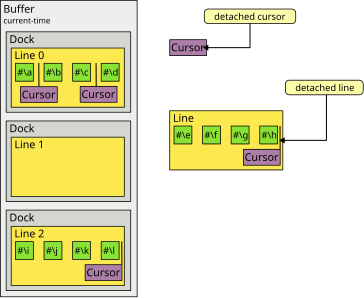
Figure 3.1: Important implementation concepts and their relations for a single buffer. Note the inclusion of docks and detached objects in contrast to the simplified architecture diagram in Figure 1.1.
Figure 3.1 illustrates the important concepts of text.editor-buffer in more detail than Figure 1.1. In particular, this version of the diagram includes the implementation concept of a dock which is an indirection between the buffer object and its attached line objects. Docks are tied to the buffer implementation (as opposed to the line implementation) and allow the buffer implementation to store additional information about a line without intruding into the line implementation. As an example, the buffer part of the standard implementation organizes lines in a tree and stores the tree structure as well as information about subtrees in its dock objects.
For many of the generic functions described in this chapter, default
methods exist which are specialized to one of the protocol classes
text.editor-buffer:cursor, text.editor-buffer:line or
text.editor-buffer:buffer and perform the required behavior,
possibly in an inefficient way, by calling other generic functions from
the implementation protocols. A new implementation does not have to
define methods on generic functions with such a default function but may
do so anyway, for example in order to provide a more efficient
implementation.
3.1 Location Comparison Implementation Protocol 
The functions of the location comparison protocol perform checks for invalid arguments, group their arguments into one or more binary operator applications, flip the comparison direction where necessary and then call the generic functions of this protocol to perform the core behavior.
- Generic Function: location< [text.editor-buffer.implementation] location1 location2 
-
Return true if location1 is positioned strictly before location2 in the buffer.
All locations have to be attached to lines which in turn must all belong to a single buffer. These preconditions are not checked. If these preconditions are violated, incorrect behavior or errors may occur.
- Generic Function: location<= [text.editor-buffer.implementation] location1 location2 
-
Return true if location1 is positioned before or at the same position as location2 in the buffer.
All locations have to be attached to lines which in turn must all belong to a single buffer. These preconditions are not checked. If these preconditions are violated, incorrect behavior or errors may occur.
- Generic Function: location= [text.editor-buffer.implementation] location1 location2 
-
Return true if location1 is positioned at the same position as location2 in the buffer.
All locations have to be attached to lines which in turn must all belong to a single buffer. These preconditions are not checked. If these preconditions are violated, incorrect behavior or errors may occur.
3.2 Item Container Implementation Protocol 
The default methods of the item container protocol perform checks for invalid arguments and invalid state then call the generic functions of this protocol to perform the core behavior.
This protocol is implemented by line classes and buffer classes but (as opposed to the item container protocol) not cursor classes since those delegate to the respective line they are attached to.
- Generic Function: item-count [text.editor-buffer.implementation] container 
-
Return the number of items in container.
- Generic Function: items [text.editor-buffer.implementation] container start end 
-
Return the subsequence of items in container designated by start and end.
start must be valid start bound for a subsequence of the items in container. end must be either
nilor valid end bound for a subsequence of the items in container. These preconditions are not checked. If these preconditions are violated, incorrect behavior or errors may occur.
- Generic Function: clear [text.editor-buffer.implementation] container 
-
Remove all items from container and return container.
The behavior of this function is equivalent to repeatedly calling
text.editor-buffer.implementation:delete-itemuntil the given line or all lines are empty and, when operating on a buffer, repeatedly callingtext.editor-buffer.implementation:join-using-bufferuntil only a single line remains. In particular, this function does not detach any cursors so that all cursors are located at index 0 of the given line or the sole remaining line after this function returns. For many data structures underlying buffers and lines, this function can be implemented orders of magnitude more efficiently compared to the above sequence of operations.
3.3 Line Link Implementation Protocol 
- Generic Function: line [text.editor-buffer.implementation] thing 
-
Return
nilor the line object to which thing is attached.If thing is a cursor, return the line to which thing is attached or
nilif thing is not attached.If thing is a dock, return the line associated with thing which is a particular line. The association never changes and is never
nil.
3.4 Buffer Link Implementation Protocol 
- Generic Function: buffer [text.editor-buffer.implementation] thing 
-
Return
nilor the buffer object to which thing is attached.If thing is a line, return the buffer in which thing is contained. The default specialized to
text.editor-buffer:linefirst retrieves the dock of thing viatext.editor-buffer.implementation:dockthen calls this function on the dock object.If thing is a dock, return the buffer in which thing is contained. The association never changes and is never
nil.
3.5 Cursor Implementation Protocol 
This protocol, including its sub-protocols, consists of methods for implementing the behavior of cursors. An implementation of this protocol must include the location comparison implementation and line link implementation protocols.
- Generic Function: stickiness [text.editor-buffer.implementation] cursor 
-
Return either
:leftor:rightto indicate the stickiness of cursor.
Cursor Attachment 
- Generic Function: attach [text.editor-buffer.implementation] cursor line index 
-
Attach cursor to line at index and return
nil.cursor must not already be attached to a line. index must not be negative and has to be less than the number of items in line. These preconditions are not checked. If these preconditions are violated, incorrect behavior or errors may occur.
- Generic Function: detach [text.editor-buffer.implementation] cursor 
-
Detach cursor from the line to which it is attached and return that line.
cursor has to be attached to a line. This precondition is not checked. If this precondition is violated, incorrect behavior or errors may occur.
Cursor Location 
- Generic Function: index [text.editor-buffer.implementation] cursor 
-
Return the index of cursor in the line to which it is attached.
cursor has to be attached to a line. This precondition is not checked. If this precondition is violated, incorrect behavior or errors may occur.
- Generic Function: (setf index) [text.editor-buffer.implementation] new-value cursor 
-
Set the index of cursor to new-value in the line to which cursor is attached.
cursor has to be attached to a line. new-value most not be negative or strictly greater than the number of items in the line to which cursor is attached. This precondition is not checked. If this precondition is violated, incorrect behavior or errors may occur.
- Generic Function: beginning-of-line-p [text.editor-buffer.implementation] cursor 
-
Return true if and only if cursor is located at the beginning of the line to which cursor is attached.
cursor has to be attached to a line. This precondition is not checked. If this precondition is violated, incorrect behavior or errors may occur.
A default method which is specialized to
text.editor-buffer:cursorexists. Simple implementations of the cursor protocol can therefore forego defining a method on this generic function. More sophisticated implementations might use a more optimized way of determining whether cursor is at the beginning of the line.
- Generic Function: end-of-line-p [text.editor-buffer.implementation] cursor 
-
Return true if and only if cursor is located at the end of the line to which cursor is attached.
cursor has to be attached to a line. This precondition is not checked. If this precondition is violated, incorrect behavior or errors may occur.
A default method which is specialized to
text.editor-buffer:cursorexists. Simple implementations of the cursor protocol can therefore forego defining a method on this generic function. More sophisticated implementations might use a more optimized way of determining whether cursor is at the end of the line.
- Generic Function: beginning-of-buffer-p [text.editor-buffer.implementation] cursor 
-
Return true if and only if cursor is located at the beginning of the buffer to which cursor is indirectly attached.
cursor has to be attached to a line. That line has to be attached to a buffer. These preconditions are not checked. If these preconditions are violated, incorrect behavior or errors may occur.
A default method which is specialized to
text.editor-buffer:cursorexists. Simple implementations of the cursor protocol can therefore forego defining a method on this generic function. More sophisticated implementations might use a more optimized way of determining whether cursor is at the beginning of the buffer.
- Generic Function: end-of-buffer-p [text.editor-buffer.implementation] cursor 
-
Return true if and only if cursor is located at the end of the buffer to which cursor is indirectly attached.
cursor has to be attached to a line. That line has to be attached to a buffer. These preconditions are not checked. If these preconditions are violated, incorrect behavior or errors may occur.
A default method which is specialized to
text.editor-buffer:cursorexists. Simple implementations of the cursor protocol can therefore forego defining a method on this generic function. More sophisticated implementations might use a more optimized way of determining whether cursor is at the end of the buffer.
Cursor Movement 
- Generic Function: backward-item [text.editor-buffer.implementation] cursor 
-
Move cursor backward by one index and return cursor.
cursor has to be attached to a line. cursor must not be positioned at the beginning of the line it is attached to. These preconditions are not checked. If these preconditions are violated, incorrect behavior or errors may occur.
A default method which is specialized to
text.editor-buffer:cursorand simply decrements thetext.editor-buffer.implementation:indexof cursor exists.
- Generic Function: forward-item [text.editor-buffer.implementation] cursor 
-
Move cursor forward by one index and return cursor.
cursor has to be attached to a line. cursor must not be positioned at the end of the line it is attached to. These preconditions are not checked. If these preconditions are violated, incorrect behavior or errors may occur.
A default method which is specialized to
text.editor-buffer:cursorand simply increments thetext.editor-buffer.implementation:indexof cursor exists.
- Generic Function: beginning-of-line [text.editor-buffer.implementation] cursor 
-
Move cursor to the beginning of the line it is attached to and return cursor.
cursor has to be attached to a line. This precondition is not checked. If this precondition is violated, incorrect behavior or errors may occur.
A default method which is specialized to
text.editor-buffer:cursorand simply sets thetext.editor-buffer.implementation:indexof cursor to 0 exists.
- Generic Function: end-of-line [text.editor-buffer.implementation] cursor 
-
Move cursor to the end of the line it is attached to and return cursor.
cursor has to be attached to a line. This precondition is not checked. If this precondition is violated, incorrect behavior or errors may occur.
A default method which is specialized to
text.editor-buffer:cursorand simply sets thetext.editor-buffer.implementation:indexof cursor to thetext.editor-buffer.implementation:item-countof the line exists.
Cursor Items 
- Generic Function: item-before [text.editor-buffer.implementation] cursor 
-
Return the item located immediately before cursor.
cursor has to be attached to a line. cursor must not be positioned at the beginning of the line it is attached to. These preconditions are not checked. If these preconditions are violated, incorrect behavior or errors may occur.
A default method which is specialized to
text.editor-buffer:cursorand simply callstext.editor-buffer.implementation:itemwith the line to which cursor is attached and(1- (index cursor))exists.
- Generic Function: item-after [text.editor-buffer.implementation] cursor 
-
Return the item located immediately after cursor.
cursor has to be attached to a line. cursor must not be positioned at the end of the line it is attached to. These preconditions are not checked. If these preconditions are violated, incorrect behavior or errors may occur.
A default method which is specialized to
text.editor-buffer:cursorand simply callstext.editor-buffer.implementation:itemwith the line to which cursor is attached and(index cursor)exists.
- Generic Function: insert-item-at [text.editor-buffer.implementation] cursor item 
-
Insert item into the items of the line to which cursor is attached at the index of cursor and return
nil.cursor has to be attached to a line. This precondition is not checked. If this precondition is violated, incorrect behavior or errors may occur.
A default method which is specialized to
text.editor-buffer:cursorand simply callstext.editor-buffer.implementation:insert-itemwith the line to which cursor is attached,(index cursor)and item exists.
- Generic Function: delete-item-before [text.editor-buffer.implementation] cursor 
-
Delete the item before cursor from the items of the line to which cursor is attached and return
nil.cursor has to be attached to a line. cursor must not be located at the beginning of the line to which it is attached. These preconditions are not checked. If these preconditions are violated, incorrect behavior or errors may occur.
A default method which is specialized to
text.editor-buffer:cursorand simply callstext.editor-buffer.implementation:delete-itemwith the line to which cursor is attached and(1- (index cursor))exists.
- Generic Function: delete-item-after [text.editor-buffer.implementation] cursor 
-
Delete the item after cursor from the items of the line to which cursor is attached and return
nil.cursor has to be attached to a line. cursor must not be located at the end of the line to which it is attached. These preconditions are not checked. If these preconditions are violated, incorrect behavior or errors may occur.
A default method which is specialized to
text.editor-buffer:cursorand simply callstext.editor-buffer.implementation:delete-itemwith the line to which cursor is attached and(index cursor)exists.
3.6 Line Implementation Protocol 
This protocol, including its sub-protocols, consists of methods for implementing the behavior of line objects. An implementation of this protocol must include the item container implementation protocol.
- Generic Function: dock [text.editor-buffer.implementation] line 
-
Return the dock which contains line.
- Generic Function: (setf dock) [text.editor-buffer.implementation] new-value line 
-
Set the dock of line to new-value.
- Generic Function: first-line-p [text.editor-buffer.implementation] line 
-
Return true if line is the first line of the buffer that contains it and false otherwise.
line has to be attached to a buffer.. This precondition is not checked. If this precondition is violated, incorrect behavior or errors may occur.
- Generic Function: last-line-p [text.editor-buffer.implementation] line 
-
Return true if line is the last line of the buffer that contains it and false otherwise.
line has to be attached to a buffer.. This precondition is not checked. If this precondition is violated, incorrect behavior or errors may occur.
- Generic Function: cursors [text.editor-buffer.implementation] line 
-
Return a list of the cursors attached to line.
The order of cursor objects in the returned list is unspecified. Furthermore, the returned list may be destructively modified by a subsequent operation on a related cursor, line or buffer object.
Whether line is attached to a buffer is of no consequence for this operation.
- Generic Function: item [text.editor-buffer.implementation] line index 
-
Return the item at index index in line.
index must be between 0 and one less than the item count of line. This precondition is not checked. If this precondition is violated, incorrect behavior or errors may occur.
Whether line is attached to a buffer is of no consequence for this operation.
- Generic Function: insert-item [text.editor-buffer.implementation] line index item 
-
Insert item into the items of line at index index and return
nil.index must be between 0 and the item count of line. This precondition is not checked. If this precondition is violated, incorrect behavior or errors may occur.
The effect of this operation on items and cursors already contained in line is the same as for
text.editor-buffer:insert-item.If a line is contained in a dock,
text.editor-buffer.implementation:note-line-changedis called with that dock, line and 1 as its arguments.
- Generic Function: delete-item [text.editor-buffer.implementation] line index 
-
Insert item at index of line and return
nil.index must be between 0 and one less than the item count of line. This precondition is not checked. If this precondition is violated, incorrect behavior or errors may occur.
The effect of this operation on items and cursors already contained in line is the same as for
text.editor-buffer:insert-item.If a line is contained in a dock,
text.editor-buffer.implementation:note-line-changedis called with that dock, line and -1 as its arguments.
- Generic Function: split [text.editor-buffer.implementation] line index 
-
Split line at index into two lines, line and a newly created line which is returned.
line contains the items and cursors preceding index and the newly created and returned line contains the items and cursors following index. For cursors the index of which is index, whether line or the new line will contain the cursor depends on the stickiness of the cursor: if the cursor is left-sticky, it will be contained by line, if the cursor is right-sticky, it will be contained by the new line.
Note that this function takes care only of creating the new line as well as transferring items and cursors. Any changes to the arrangement of lines within a buffer are handled by
text.editor-buffer.implementation:split-using-bufferwhich typically calls this function.To create the new line, the method on this generic function specialized to
text.editor-buffer.standard-line:line, callstext.editor-buffer.implementation:make-line-likewith line and the keyword arguments:contents,:first-line-pand:last-line-p. The method on this generic function specialized totext.editor-buffer.simple-line:line, callstext.editor-buffer.implementation:make-line-likewith line and the keyword argument:contents.
- Generic Function: join [text.editor-buffer.implementation] line1 line2 
-
Join line1 with line2 and return the single remaining line.
Items and cursors from line2 are transferred to line1. Note that this function takes care only of items and cursors. Any changes to the arrangement of lines within a buffer are handled by
text.editor-buffer.implementation:join-using-bufferwhich typically calls this function.
- Generic Function: make-line-like [text.editor-buffer.implementation] line
&keycontents first-line-p last-line-p&allow-other-keys¶ -
Make and return a new line object similar to line.
The purpose of this function is to allow clients to use custom line classes which may or may not be subclasses of the line classes provided by text.editor-buffer. To this end, the function
text.editor-buffer.implementation:splitcalls this function when splitting a given line by creating a similar line object, also retaining the original line object and then distributing items and cursors between the two lines. Since the client can supply an initial line of any class when a buffer is created and control the class of lines added by splitting, the client has control over the creation of all line objects without having to interfere with the respectivetext.editor-buffer.implementation:splitmethod.The keyword arguments accepted by this function depend on the class of line. When line is a
text.editor-buffer.standard-line:line, the default method ontext.editor-buffer.implementation:splitcalls this function with the keyword arguments:contents,:first-line-pand:last-line-p. When line is atext.editor-buffer.simple-line:line, the default method ontext.editor-buffer.implementation:splitcalls this function with the keyword argument:contents. For a custom line class with an associated custom method ontext.editor-buffer.implementation:split, a different set of keyword arguments may be supplied and accepted. In general, methods on this generic function should accept the same set of initargs as is accepted by the respective line class and callcl:make-instancewith the provided initargs.
3.7 Dock Protocol 
This protocol, including its sub-protocols, consists of methods for implementing the behavior of dock objects. An implementation of this protocol must include the line link implementation and buffer link implementation protocols. A dock object is associated with a particular line object and a particular buffer object for its whole existence.
- Generic Function: note-line-changed [text.editor-buffer.implementation] node line item-count-diff 
-
Adjust information stored in node according to item-count-diff and return unspecified values.
node is the dock that contains line. item-count-diff indicates the amount by which the item count has changed and is typically either 1 or -1.
This function is called when the item count of line changes so that any summary information such as item counters stored in node can be adjusted.
3.8 Buffer Implementation Protocol 
This protocol, including its sub-protocols, consists of methods for implementing the behavior of buffer objects. An implementation of this protocol must include the item container implementation protocol.
- Generic Function: current-time [text.editor-buffer.implementation] buffer 
-
Return the time stamp of the most recent operation that modified buffer.
- Generic Function: line-count [text.editor-buffer.implementation] buffer 
-
Return the number of lines in buffer.
- Generic Function: find-line [text.editor-buffer.implementation] buffer line-number 
-
Return the line with line number line-number in buffer.
line-number must not be negative and has to be smaller than the number of lines in buffer. This precondition is not checked. If this precondition is violated, incorrect behavior or errors may occur.
- Generic Function: line-number-using-buffer [text.editor-buffer.implementation] buffer dock line 
-
Return the line number of line within buffer.
The following relations have to be true:
(eq dock (andtext.editor-buffer.implementation:dockline))(eq buffer (. These preconditions are not checked. If these preconditions are violated, incorrect behavior or errors may occur.text.editor-buffer.implementation:bufferdock))
- Generic Function: split-using-buffer [text.editor-buffer.implementation] buffer dock line index 
-
Split line at index into two lines, a modified version of line and a newly created line, and return the newly created line.
The first line is
cl:eqto line and contains the items and cursors preceding index and the second line contains the items and cursors following index.The following relations have to be true:
(eq dock (andtext.editor-buffer.implementation:dockline))(eq buffer (. These preconditions are not checked. If these preconditions are violated, incorrect behavior or errors may occur.text.editor-buffer.implementation:bufferdock))
- Generic Function: join-using-buffer [text.editor-buffer.implementation] buffer dock line 
-
Join line with the line following it in buffer which we will call next-line and return the single remaining line.
This function normally calls
text.editor-buffer.implementation:joinwith line and next-line to transfer items and cursors from next-line to line. next-line becomes detached from buffer.The following relations have to be true:
(eq dock (andtext.editor-buffer.implementation:dockline))(eq buffer (. line must not be the last line of buffer. These preconditions are not checked. If these preconditions are violated, incorrect behavior or errors may occur.text.editor-buffer.implementation:bufferdock))
3.9 Update Implementation protocol 
- Generic Function: update [text.editor-buffer.implementation] buffer time sync skip modify create 
-
This function is typically called by
text.editor-buffer:updateand behaves mostly like that function except- This function dos not allow the value
nilfor the time parameter. Instead the caller should indicate the initial time, by passing-1for time. - This function expects the sync, skip, modify and create arguments to be functions instead of function designators.
- This function dos not allow the value
4 Implementations 
text.editor-buffer includes two modules each of which contains an implementation of all relevant protocols. However, the two modules are optimized for different purposes:
- The “simple” module contains an implementation that is, as the name suggests, optimized for simplicity of its data structures, algorithms, and code without any performance considerations. This module serves mainly as a reference in the sense that the behavior of other implementations can be compared to this baseline, for example in randomized tests.
- The “standard” module contains an implementation that is optimized for high performance in most usage scenarios. To this end, the module employs more complicated data structures, caches and optimized code.
Clients of text.editor-buffer should generally use the standard implementation
since it provides consistent performance across most usage scenarios
without exposing clients to the internal complexity. This is why the
convenience function text.editor-buffer:make-buffer by default
creates and returns a text.editor-buffer.standard-buffer:buffer which
is set up to contain instances of
text.editor-buffer.standard-line:line.
4.1 Simple Implementation 
The “simple” implementation is distributed across two packages:
text.editor-buffer.simple-line and text.editor-buffer.simple-buffer. While the two
packages are intended to be used together, it is possible to use only
one of those and use a different implementation for the remaining
aspects.
- Class: line [text.editor-buffer.simple-line] 
-
A simple line that can store items and cursors but does not lend itself to efficient implementation of the relevant protocol operations.
- Class: left-sticky-cursor [text.editor-buffer.simple-line] 
-
A left-sticky cursor that works with instances of
text.editor-buffer.simple-line:line.
- Class: right-sticky-cursor [text.editor-buffer.simple-line] 
-
A right-sticky cursor that works with instances of
text.editor-buffer.simple-line:line.
- Class: buffer [text.editor-buffer.simple-buffer] 
-
A simple buffer that can contain line instances and supports the buffer protocols but is not efficient at looking up or manipulating its lines.
4.2 Standard Implementation 
The “standard” implementation is distributed across two packages:
text.editor-buffer.standard-line and text.editor-buffer.standard-buffer. While the
two packages are intended to be used together, it is possible to use
only one of those and use a different implementation for the remaining
aspects.
- Class: line [text.editor-buffer.standard-line] 
-
A line class that supports an efficient implementation of the edit protocol operations by representing the contained items either as a simple vector or as a gap buffer.
- Class: left-sticky-cursor [text.editor-buffer.standard-line] 
-
A left-sticky cursor that works with instances of
text.editor-buffer.standard-line:line.
- Class: right-sticky-cursor [text.editor-buffer.standard-line] 
-
A right-sticky cursor that works with instances of
text.editor-buffer.standard-line:line.
- Class: buffer [text.editor-buffer.standard-buffer] 
-
A buffer class that supports an efficient implementation of the edit protocol operations by representing the contained lines in a binary tree and by caching various pieces of information at different levels.
The simplest way to create a correctly configured instance of this class is the convenience function
text.editor-buffer:make-buffer.
Concept Index 
| Jump to: | D L R S T |
|---|
| Jump to: | D L R S T |
|---|
Function and Macro and Variable and Type Index 
| Jump to: | (
A B C D E F I J L M N R S U |
|---|
| Jump to: | (
A B C D E F I J L M N R S U |
|---|
Changelog 
- Release 0.3 (not yet released)
- Release 0.2 (2026-08-08)
- When lines are deleted from a
text.editor-buffer.standard-buffer:buffer, the corresponding entries are now cleared from an internal cache to prevent garbage retention.When the occupancy of the cache drops beyond a certain ratio, the underlying storage vector is now shrunk to release the memory.
- The new function
text.editor-buffer:clearcan be used to remove all items of either a line or an entire buffer conveniently and efficiently. - When a
text.editor-buffer.standard-line:lineis split, the underlying storage vector is now shrunk as intended.
- When lines are deleted from a
- Release 0.1.0 (2026-02-06)
- Initial import based on Cluffer predominantly written by Robert Strandh.
Major differences compared to Cluffer are listed below.
- All protocols have been split into an external part and an implementation part.
The external part is intended to be safe and convenient while the
implementation part is intended to be efficient and minimal. On the safe vs.
efficient axis, functions in external protocols check preconditions while
functions in implementation protocols assume correct arguments. On the minimal
vs. convenient axis, a good example are convenient external functions
location{<=,<,=,/=,>,>=}each of which accept any number of arguments. On the implementation side, there are only the (almost) minimal functionslocation{<=,<,=}each of which accepts exactly two arguments. - Compared to Cluffer, lines in the
standard-linemodule are less frequently converted between the gap-buffer representation and the plain vector representation. This change makes many operations more efficient, in particular sequences of operations that used to trigger many back and forth conversions. - Compared to Cluffer, it is easier for clients to supply their own
linesubclasses due to two changes: Firstly, when the split operation has to make a new line object, it uses the new generic functionmake-line-likeon which clients can define their own methods. Secondly, thestandard-linemodule no longer useschange-classto implement the transition between open and closed lines. The latter changes also has a positive impact on performance in all tested implementations. - The
standard-buffermodule now caches information that is needed for mapping line numbers to line objects and vice versa. Compared to Cluffer, these caches allow many common operations to be performed without splaying the tree at the core of thestandard-bufferdata structure. - This library offers the convenience functions
make-buffer,insert-itemsandinsert-items-atfor the common tasks of creating a buffer and adding items in bulk.
- Initial import based on Cluffer predominantly written by Robert Strandh.